Private evidence organization for iPhone
Build one clear evidence packet.
Proofloom helps you collect source files, review on-device text, build a chronology, and export a traceable PDF packet — without sending your evidence to a developer cloud.
Proofloom in 40 seconds
See scattered records become one clear packet.
Follow the complete flow from private source collection and human-reviewed text to a traceable PDF export.
A calm, four-step workflow
Keep the source. Shape the story.
Proofloom separates source preservation from interpretation, so every edit remains reviewable and every exhibit remains connected to the file it came from.
-
01↓
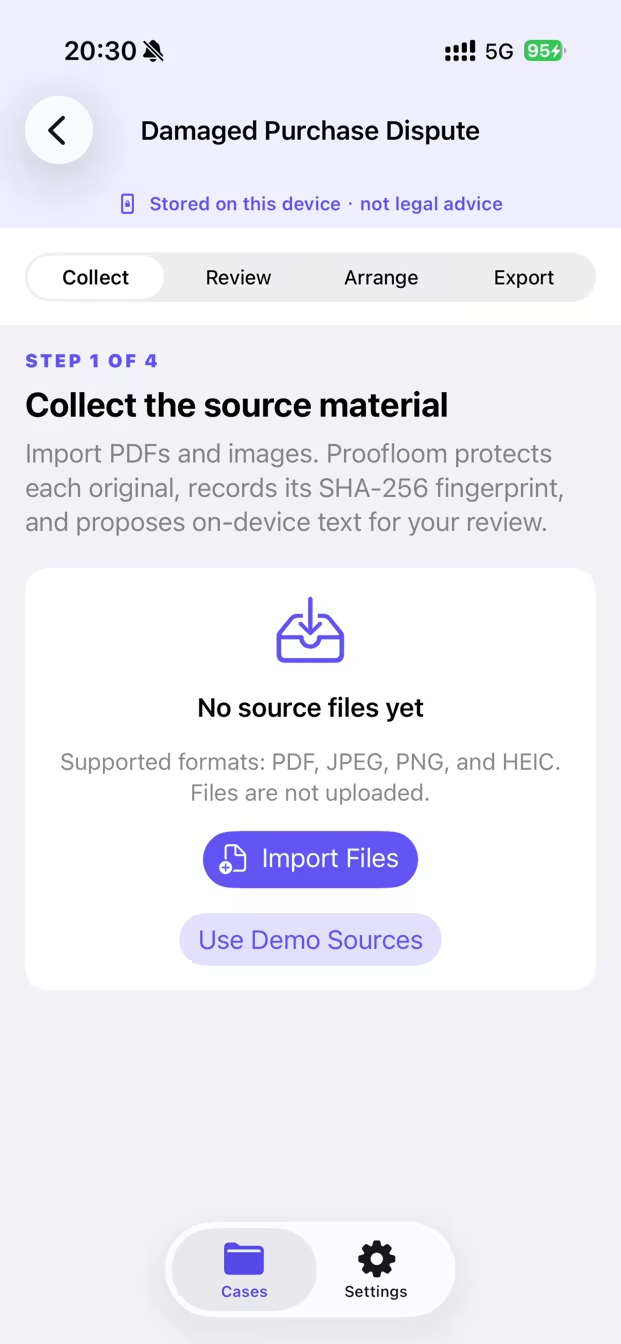
Collect
Import PDFs, JPEGs, PNGs, and HEIC photos. Proofloom stores a protected local copy and records its SHA-256 fingerprint.
-
02Aa
Review
On-device text recognition proposes useful details. Nothing becomes part of your packet until you accept or reject it.
-
03≡
Arrange
Build a clear chronology, group records into exhibits, and keep each statement linked to its supporting source.
-
04↗
Export
Generate one reviewable PDF with a cover, index, chronology, exhibits, original pages, and source register.
Inside Proofloom
A workspace built around your evidence.


One coherent deliverable
A packet people can actually follow.
Instead of a folder full of unexplained files, Proofloom creates a navigable record of what happened, when it happened, and which source supports each entry.
Organizing one purchase problem? Use the refund evidence checklist to map the transaction, issue, prior contact, and requested outcome.
- ✓ Cover and packet index
- ✓ Chronology with source references
- ✓ Exhibits with page ranges
- ✓ Original source pages
- ✓ Source register and PDF fingerprint

Private by architecture
Your evidence stays yours.
Proofloom does not require an account and does not operate cloud storage. Imported records, recognized text, case metadata, and generated packets remain in protected app storage on your iPhone.
Read the full privacy policySimple ownership
Organize first. Unlock export once.
Download free, organize and preview without paying, then unlock unlimited finished PDF generation and sharing with one in-app purchase.
U.S. export unlock price: $9.99. Local App Store pricing may vary.
- Generate complete PDF packets
- Share or save finished exports
- Restore through your Apple Account
Good to know
Clear answers before you begin.
Need something else? Visit support or email merryjerry@mail.com.
Does Proofloom upload my files?+
No. Proofloom has no developer-operated cloud sync. Your app data remains in protected local storage unless you choose to share an exported copy.
Does it decide what counts as evidence?+
No. Proofloom organizes records; it does not determine authenticity, guarantee admissibility, predict an outcome, or provide legal advice.
What happens if text recognition is wrong?+
Recognized text is always presented as a suggestion. You decide whether to accept or reject it before it is used.
Can I protect the app with Face ID?+
Yes. App Lock can use the authentication available on your device, including Face ID, Touch ID, or the device passcode.
Can I restore my purchase?+
Yes. Open Settings in Proofloom and choose Restore Purchase while signed in to the Apple Account used for the purchase.

Proofloom for iPhone
Make the record easier to understand.
Collect carefully. Review deliberately. Export with a clear line back to every source.